Srimax is excited to announce our new product Output Messenger , a fresh & advanced Instant Messenger for Office.
 Try Output Messenger for Free.
OMessenger Vs Output Messenger
How Output Messenger differs from OMessenger:
Try Output Messenger for Free.
OMessenger Vs Output Messenger
How Output Messenger differs from OMessenger:
Try Output Messenger for Free.
OMessenger Vs Output Messenger
How Output Messenger differs from OMessenger:
- Server Based: For more reliable communication & to handle any type of network clients. Central management of users, groups & chat History.
- Multiple Device Login: With single user account, you can login from multi device (desktop / mobile / tablets / web browser) at the same time.
- Voice and Video conferencing: For holding one-to-one and multi-party video conferencing.
- Chat rooms: Group Discussion for projects & teams.
- Security: All communication data are encrypted with SSL protocol.
- Desktop Sharing: Share your screen with colleagues.
- Other features: Off-The-Record messaging, API for integeration, Smart User interface etc

|
|

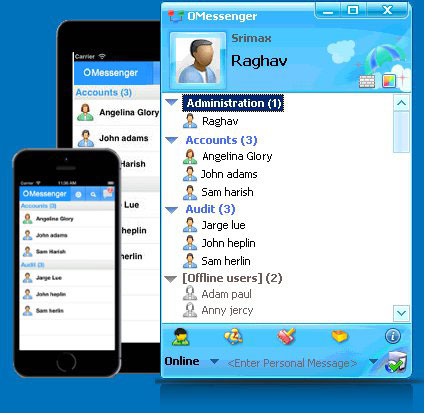
Secure and Private Instant Messenger for all Business
Download Now
Version 7, 20 days fully functional trial
Total Downloads: 860,010 from Oct 14, 2004





Enjoy messaging experience within Office
with the world's best Instant Messaging
Software
- Communicate Securely and Safely within Office and from anywhere in the world.
- Peer-to-Peer Server-less technology ideal for small businesses, and with Server architecture ideal for corporates.
- Packed with seamless features and easy customization with enormous flexibility to meet each business's specific needs.
- Quick installation and ready to use in less than a minute.
- Lightweight, Power-full and Fast and Integrable.
- SDK tool kit for integrating custom applications.
- Lifetime License, Onetime Cost, Unlimited Support
- Cross Platform and all Platform Support
- One to One Chat
- Group Messaging
- File Transfer
- VoIP Voice Chat
- Offline Messaging
- Internal Mailing
- Schedule Messaging & Remainder
- Alert Notes
- Announcements
- Remote Desktop
- Chat History Logs
Key Features
- Active directory User Authentication
- LDAP User Authentication
- User & Group Management with permissions
- Plugins to Enhance
- Android App
- iPhone App
- iPad App
- Web Browser Client
- Mobile Browser Client
- Online Helpdesk Plugin
- Office Wall Plugin
- SDK to develop Custom Plugin
Server Pro Features
Why OMessenger?
Traditional instant messengers are not the best solution for communicating with co-workers in a large office building. Besides the fact that anyone from the outside can interrupt your work, there are also a few risks regarding security. An excellent alternative is OMessenger, which is designed specifically for office communications. The software provides the same functionality as other instant messengers, but it relays messages over a local network or VPN. The software offers real-time Textual Communication, Voice Communication and File between users of local network conveniently and quickly, and is designed for used in Small Office/Home Office (SOHO), Small to Medium Business (SMB), and Workgroup to Enterprise environments.Your Team Will Want to Use:
You can share ideas, files, codes with your team no matter where you are located, and its perfect for projects, teams and departments.Cristal Clear, Cross platform Voice Communication:
OMessenger's VoIP based voice communication is best known for it's superior sound quality and minimal use of CPU resources. Voice communication can be activated with a single click of the mouse.No Data Theft - Totally Secure:
Data Communication will be in your private network, which prevents external anonymous access. Messages are encrypted with AES - 128 bit cryptography to ensure substantial increase in the level of security.The Power of Server Pro and Cluster of Servers
Server Pro bring more Power, Control, and Collaboration to your organization, with a centralized Chat Server for Reliable Communication. With Server Pro, Main Office, all Branch Offices and Mobile Users can connect and Communicate between each another. Cluster Server will be useful for providing Customer Support to clients, link multiple branch Servers.Help Desk Live Chat:
Live Support Plugin allows you to interact with your website visitors in real-time, and helps you improve your Sales and Customer Service. It's able to route visitor's messages from website directly to your IM Chat Window and also to different departments."Office Wall" Social networking within workplace:
Closed Social media within Office network plays a huge role in building a fun corporate culture. Without a good environment, employees won't love their work and that translates to a business failed. A good corporate culture can help bond employees together and make them feel closer to the company.Android and iOS App is available:
The application can be used on Windows, Mac OS X and Linux and it is available for Android and iOS Smatphone devices as well.Chat History:
Conversation history and Log information are stored in Chat Client for reference, and can also store in Central Server for records management.Best Price Guaranteed Support:
Software can be purchased through a single, reasonably priced, one-time-only license fee. Extra license for additional computers can be purchased in future by upgrading the license pack. OMessenger is committed to uncompromising excellence in customer support via email for both registered and unregistered users.

